
Introduction
Extensions add new functionality to various predefined data types (e.g., Int, Double, String…), as well as to user-defined data types, structures and enumerations.
Personally, I use many extensions to prevent the repetition of recurring code or to define complex code once. Extensions can also make your code more readable.
In this lesson, I will cover a few examples that show how useful the use of extensions can be. I hope that some examples are also useful to you.
Celsius, Fahrenheit and Kelvin
It is an excellent idea to use our recurring example of temperature conversion to create our first extension for the built-in Double data type:
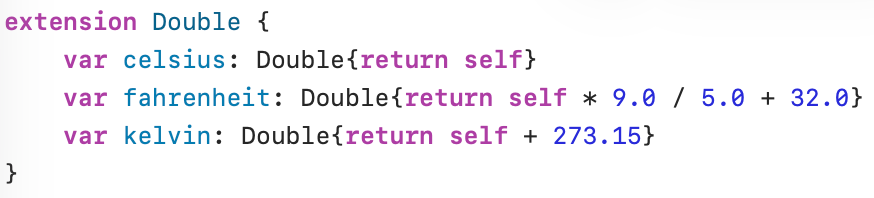
An extension starts with the keyword extension, followed by the type (Double) under which the extension falls. In the extension we defined a computed property for celsius, fahrenheit and kelvin.
Today, in Ostend (Belgium) the actual temperature is 24.0 degrees Celsius:

To refer to one of the computed properties we use the dot notation: 24.0.celsius is the value (24.0) assigned to the computed property celsius. And temperatureCelsius.fahrenheit and temperatureCelsius.kelvin refer to the computed properties fahrenheit and kelvin.
Tomorrow we expect 30.0 degrees Celsius in Ostend. Below is the calculation in degrees Fahrenheit and degrees Kelvin:

Rounding numbers
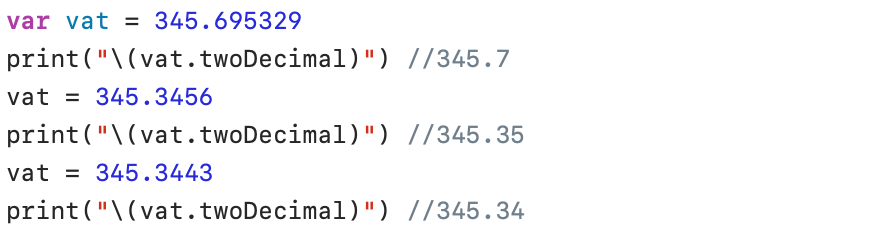
In Belgium, the sales tax (VAT) calculation must be rounded to the second digit after the decimal point. If the third digit after the decimal point is 5 or higher, the second digit after the decimal point is increased by 1. Because I need this small algorithm so often, I have made an extension for it:

The Swift rounded(_:) method without arguments rounds a value to the nearest whole number.
And here are some results:
Removing spaces
It is sometimes useful to remove excess spaces in a string. In the following paragraphs, three extensions are explained and discussed in more detail: trimAll , trimRightand trimLeft.
trimAll
The following extension removes all spaces from a String. The extension is split into two parts: in the first part (trimSpaces()), all spaces are removed and the result is assigned to a new String variable; in the second part (trimAll()), the function from the first part is used to modify the original value (self).
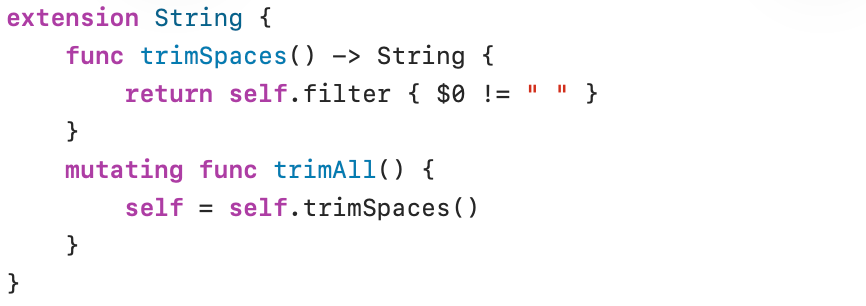
The filter(_:) method filters a collection (String, Array, Dictionary, etc.) based on the specified condition. The condition (a character of the new string must differ from a space) is specified in a trailing closure ({$0 != ” “}). The filter(_:) method returns the result in a new collection.
Because Swift does not allow modifying properties of a Struct or Enum from an own method, or modifying its own instance, it must be explicitly indicated that modifications are allowed. This is done by placing the keyword mutating before the function. The mutating function trimAll() modifies the value of the original variable (self).
The mutating keyword allows a method inside a struct or enum to change its properties or its own instance.
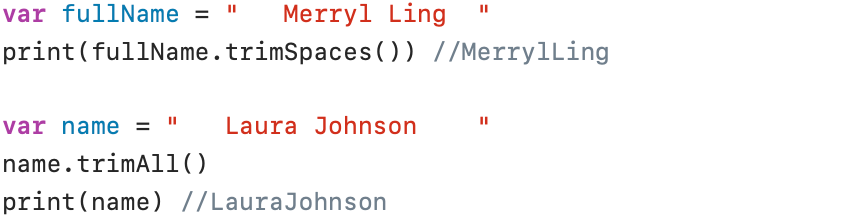
And now we have two functions that we can use:
trimRight
The trimRightSpaces() and trimRight() functions defined in the next extension remove the spaces at the right end of a string. Here too, trimRight() is a mutating function that changes the original value of the String.
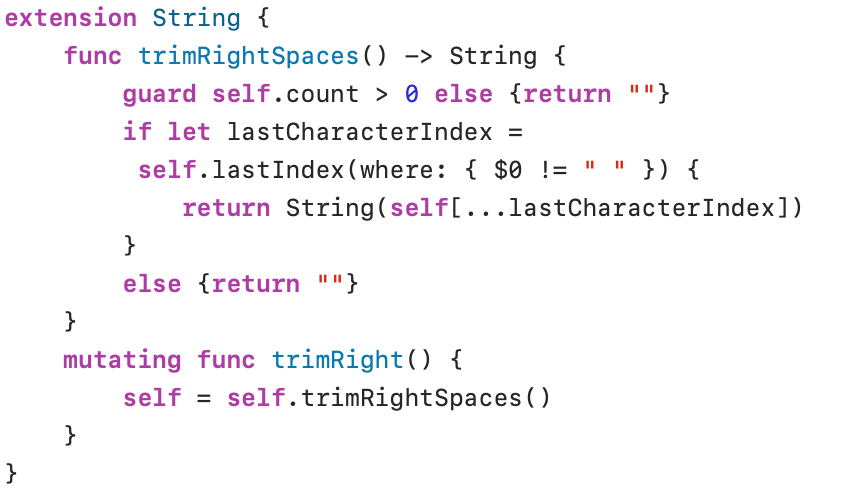
In this extension the Swift function lastIndex(where:) returns the index of the last character that matches the condition (the last character that differs from a space: {$0 != ” “}). Because all characters in the original string can be spaces, the return value can be nil.
the statement return String(self[…lastCharacterIndex]) returns a string that starts at the first character and goes up to the index specified by the variable lastCharacterIndex.
And an example to show how it works:

trimLeft
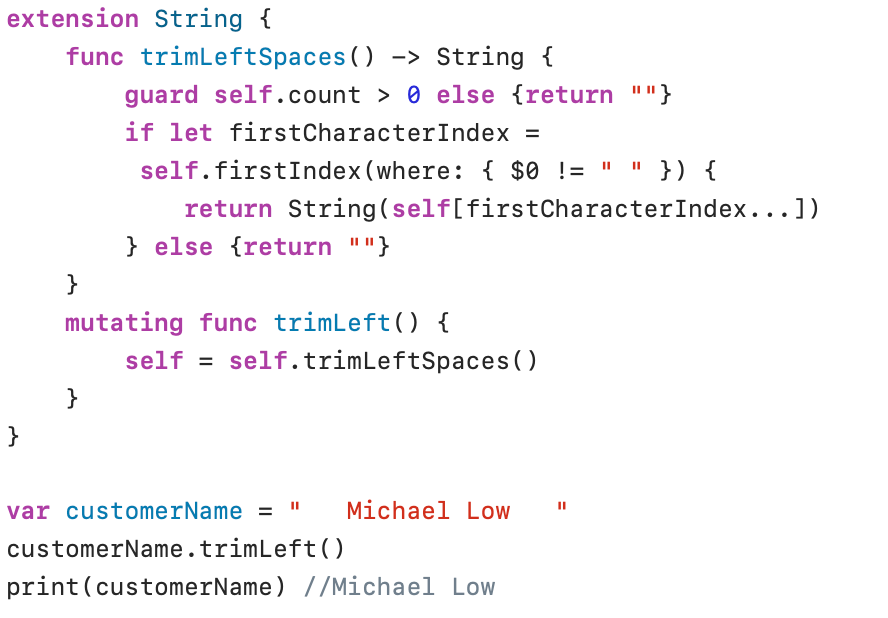
The functions trimLeftSpaces() and trimLeft() can be used to remove all leading spaces in a String. The code used in the following implementation is almost identical to the trimRight() code developed in the previous paragraph.
Strings with subscripts
You may recall that in Swift, it is difficult to define a substring from an original string. The ability to use characters with different internal lengths within a string makes the direct use of subscripts difficult. In our lesson on Fundamentals we created an offsetBy starting from startIndex or EndIndex.
In this paragraph, I want to show that we can define an index for a string to simplify access to different characters in a string.
Access a single character
In the next expansion, I define a subscript with an Int index parameter and a Character as the return value.
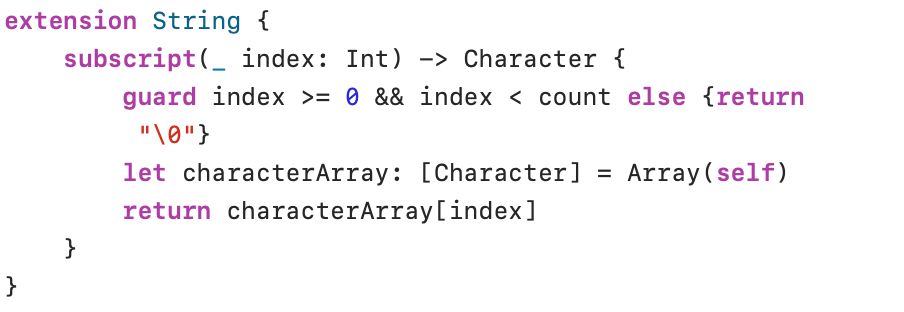
In Swift, a string can easily be converted into an Array of Characters. self refers to our string and Array(self) creates an Array of Characters stored in a constant Array called characterArray. And as you know, elements in an Array can be addressed with a subscript. In this way, you can easily return the element at the specified index position of the characterArray.

One more note: "\0" is a special, not printable character. It is called the null character.
Retrieve a substring with a subscript
Create A substring from an Array
In the same way, an array can be used to define a substring:
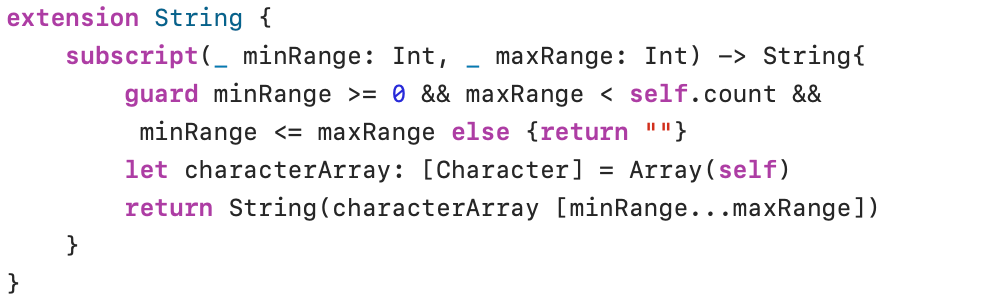
In the guard statement, we added a check where the lower bound (minRange) must be less than or equal to the upper bound (maxRange). The return statement uses the range operator (…) to retrieve the data from the array. Now, you can create a substring with the following statements (minRange and maxRange are separated by a comma):

Create a substring with startIndex and offsetBy
The way we have extracted characters and substrings from a string in the previous paragraphs is easy to understand, but makes inefficient use of memory (both the string and the array are stored in memory). A slightly more difficult, but much more efficient way, is by using startIndex and offsetBy, as we explained in the Fundamentals lesson:
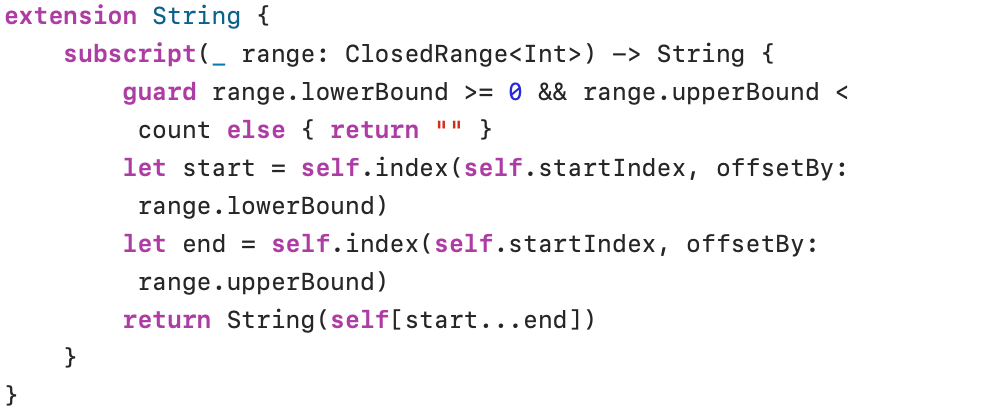
The range parameter (type ClosedRange<Int>) defines a lowerBound and a upperBound of a closed range. The index value (index(_:offsetBy:)) of the constants start and end are calculated from the property startIndex and the parameter offsetBy:.
Because the parameter range is defined as type ClosedRange<Int>, we can now also use the closed range operator (…) to delimit our substring:
