
Introduction
In the previous lesson, we learned how to assign a value to a constant or variable. In this second lesson, we will focus on numeric and String expressions and assigning the result of an expression to a constant or variable. We also introduce the use of optional data types to detect and resolve potential errors.
Numerical assignment

The assignment operator in Swift (=) assigns a value on the right-hand side to a constant or variable on the left-hand side.

Swift will strictly check whether the data type on the left hand side matches the data type on the right hand side. If they do not match, an error message appears. In the previous example the data type of the variable myPrice is String. In the second line, somebody tried to assign the value 98.5 (Double) to the String variable myPrice.
The data type of the left hand side must match the data type of the right hand side!
In the examples above, we used a single value on the right-hand side. However, it is also possible to evaluate an entire expression on the right hand side and assign the result of this expression to the constant or variable on the left-hand side.
Arithmetic expressions
The following operators can be used in Swift to construct an arithmetic expression:
| Operator | Description | Example | Result |
|---|---|---|---|
| + | Addition | 5 + 3 | 8 |
| – | Subtraction | 7 – 5 | 2 |
| * | Multiplication | 3.5 * 6.3 | 22.05 |
| / | Division | 8 / 4 | 2 |
| % | Remainder | 7 % 3 | 1 |
To prevent incorrect results, Swift also carefully checks whether all variables or values on the right-hand side of an expression are of the same type.
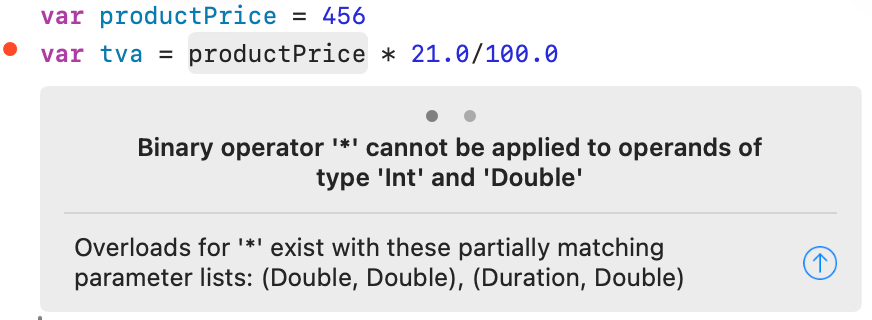
In the example above, the variable productPrice is an Int. The literals 21.0 and 100.00 are of type Double. Swift does not allow mixed operations. To avoid an error message, you can tell Swift to treat the variable productPrice as a Double. To do this, place the desired type before the variable or constant and enclose the variable or constant in parentheses (Double(productPrice)).

Combined operators
Swift has four special operators that combine an operation with an assignment:
| Operator | Description | Example | Result |
|---|---|---|---|
| += | addition and assignment | var value = 2 value += 3 | value = 5 |
| -= | subtraction and assignment | var value = 7 value -= 3 | value = 4 |
| *= | multiplication and assignment | var value = 5 value *= 2 | value = 10 |
| /= | division and assignment | var value = 20 value /= 5 | value = 4 |
String assignment
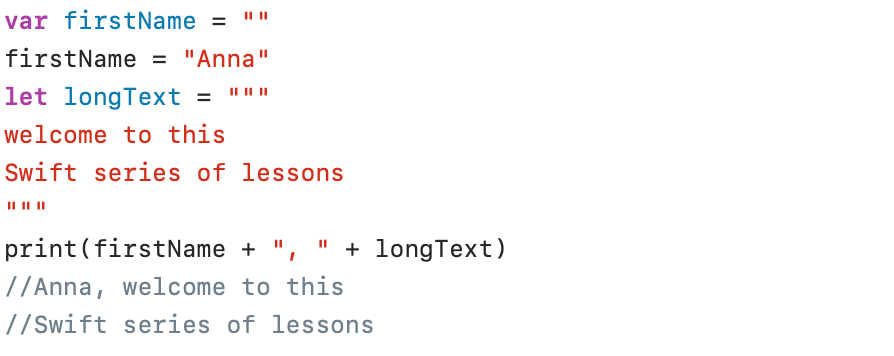
Definition
A String literal is a piece of text surrounded by double quotation marks (“). A String that spans multiple lines must be enclosed in triple double quotation marks (“””).
Concatenation
Two strings can be concatenated into a new string using the plus (+) sign (print (firstName + “, ” + longText)).
The print(_:separator:terminator:) method
The print function (print (firstName + “, ” + longText)) used in the first example displays the concatenated String in parentheses. If you also want to print a constant or variable within the print function, you can enclose it in \().

String properties and methods
Properties
isEmpty
An empty String can be created by placing two double quotation marks one after the other (var firstName = “”).
The isEmpty property can be used to check whether a String is empty or not.

count
The count property returns the number of characters in a String:

startIndex – endIndex
The property startIndex refers to the first character in a String and the property endIndex refers to the positionafterthe last character in a String.

Method names are always followed by parentheses. Properties are written without parenthesis.
Methods
uppercased() – lowercased() – capitalized()
The uppercased() and lowercased() methods convert a String to either uppercase or lowercase. The capitalized() method changes the first letter of each word in the text to a capital letter and all other characters to lowercase.

hasPrefix() – hasSuffix()
The hasPrefix(_:) method checks whether a given String begins with a specified prefix. The hasSuffix(_:) method checks whether a given String ends with a specified suffix. Both methods return either true or false .

contains()
The contains(_:) method checks whether a String contains a specified String. This method returns either true or false.

insert()
The insert(_:at:) method can be used to insert a character into a String . In the following example an exclamation mark (“!“) is added at the position indicated by the property endIndex:

The insert(_:at:) method can also be used to insert a String (“again “) at a specified index position (8 positions further (offsetBy:) than the startIndex).
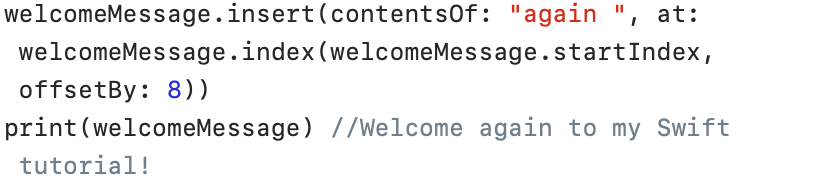
In Swift, not all characters in a string need to occupy the same amount of memory space. Foreign language characters or emojis often take up multiple bytes. Therefore, in Swift, the correct position within a String must first be calculated. This calculated value can then be used by String.index().
replacing()
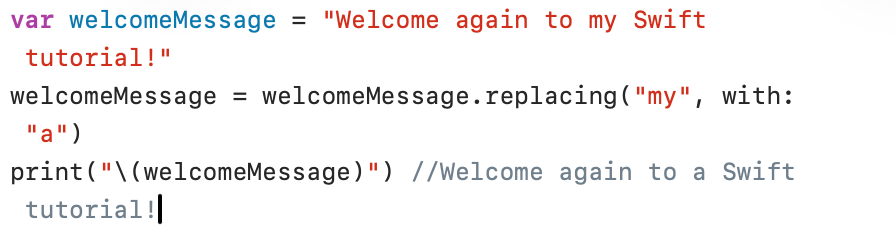
The replacing(_:with:) method can be used to replace text inside a String:
removeFirst() – removeLast()
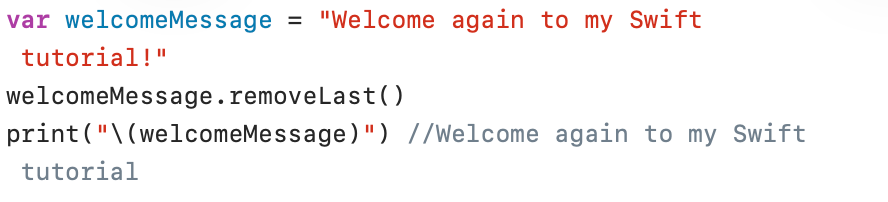
The removeFirst() and removeLast() methods can be used to remove the first and last characters of a String, respectively
Convert from a String
A String can be converted to a numeric value using Int(), Float(), or Double() :
var age = Int("20")
var productPrice = Double("45.25")
The examples above work fine. But what happens if an incorrect String for age is entered (for example, the string (“2o” (with the letter “o” instead of the digit 0))? In that case, the conversion fails.
Optional data type
How does Swift solve such a problem? Take a look at the following example:
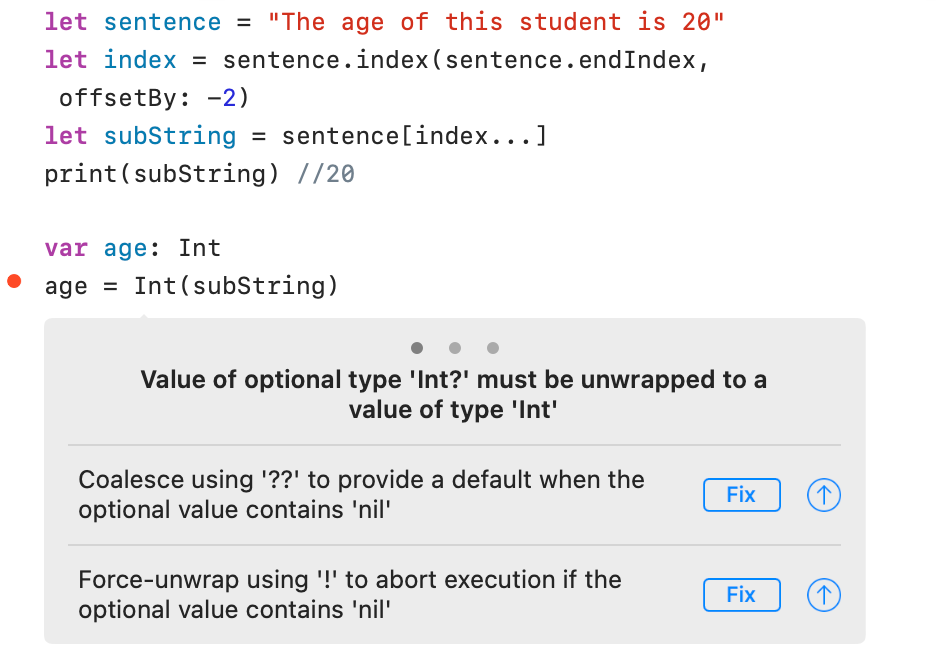
Swift knows that the conversion can fail and therefore forces us to solve this problem. In the error explanation Swift refers to an optional data type Int? .
An optional data type can have a value or no value (nil). No value is indicated in Swift by nil. The term nil is reserved for optional data types. An ordinary variable or constant cannot be nil.
Check optional data types
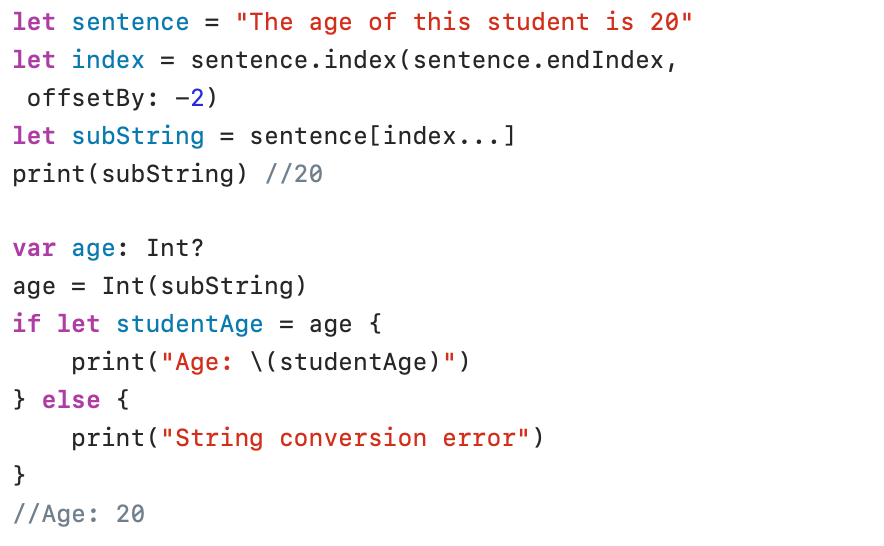
In the example above, we declared the variable age as optional (Int?). Swift no longer displays an error message. We must now ensure that a failed conversion (age = nil) leads to a correct solution to the problem.
The if statement seems a bit strange. The question asked here is: is it possible to assign the value of the optional variable age to the normal constant studentAge? The answer to this is, of course, true or false. true if the variable age contains a value, false if the variable age is nil. In the example above, the conversion appears to be successful and the constant studentAge is printed.
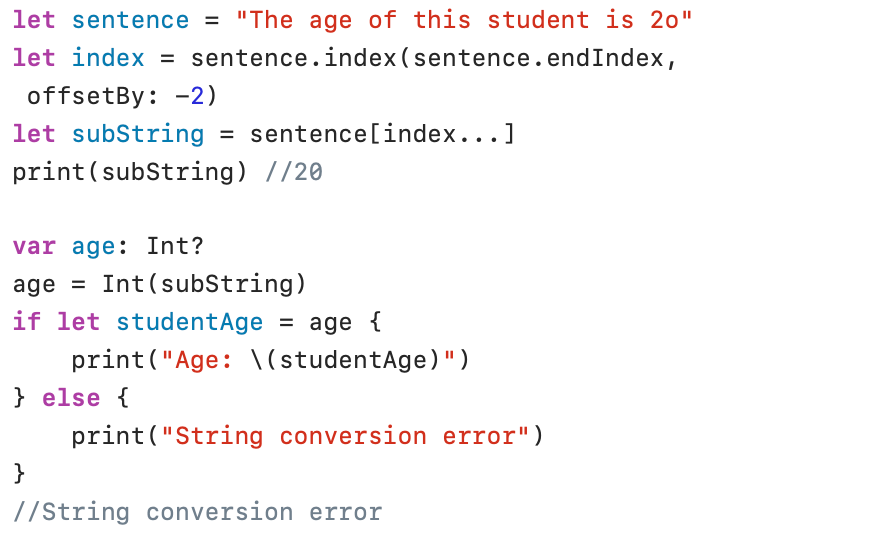
In the example above, I replaced the number zero (0) in the string with the letter o. In this case, the conversion fails, the assignment from age to studentAge fails, and the text “String conversion error” is printed.
Convert to a String
A numeric value (Int, Float, Double…) can be converted to a String using String() :

String(123) converts the Int literal 123 to the String “123”. The is operator is used in the following statement to check if the type of value is indeed a String.