Introduction
In this lesson, we will discuss three types of collections: Arrays, Sets, and Dictionaries. An Array is used to store an ordered collection of values, a Set is used to store an unordered collection of unique values, and a Dictionary can contain an unordered collection of keys and their corresponding values.
Arrays
An Array will store values in an ordered list. It is called an ordered list because all items retain their assigned positions. All values in an array must be of the same type. Elements in an array can be referenced by their subscript (index) placed between square brackets. The first element in an Array has an index of 0.
Create an Array
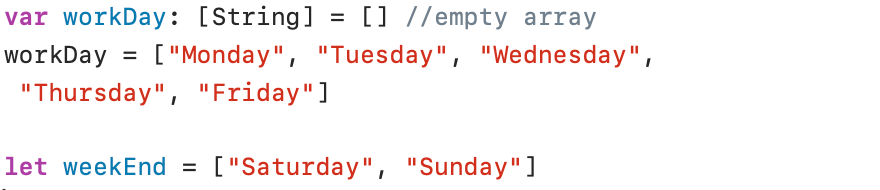
An Array can be declared by placing the data type between square brackets ([]) (see variable declaration workDay) or by immediately assigning the data (see constant declaration weekEnd) to the Array constant or variable. In this latter case, Swift infers the data type from the data passed to the Array.
An empty Array can be created with [data type] = [].
Accessing an array element
An array element can be accessed by using an index (value starting at 0) to refer to a specific element in the array:

The subscript (index) can be a constant, a variable or even an expression.
Note, if you try to access the element weekEnd[2], you'll get a runtime error.
Array properties and methods
Array Properties
isEmpty
The isEmpty property is used to check whether an array is empty:

In the previous example, the String array workDay is not empty: workDay was initialised with an empty String. In the next example, the array workDay is empty:

count
The count property counts the number of elements in an array:

Array Methods
append()
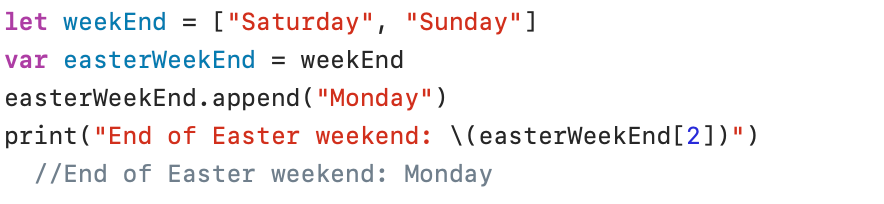
The append(_:) method adds an element to the end of an array:
insert()
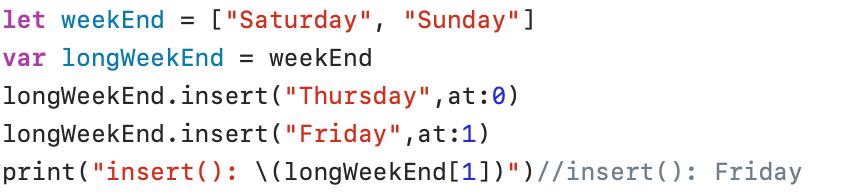
The insert(_:at:) method adds an element at a specified position in an array:
contains()
The contains(_:) method checks whether an element is present in an array:

remove()
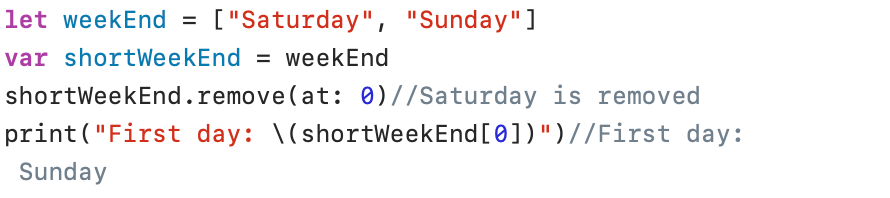
To remove an element from the array, you can use the remove(at:) method:
removeAll()
The method removeAll() removes all elements from an array:

Sets
A Set is used to store elements in an unordered way. It is called unordered because the position of the elements in the Set is not fixed. Once again, all elements in a Set must be of the same type. Elements in a Set must be unique. Duplicate values are therefore ignored.
Create a Set
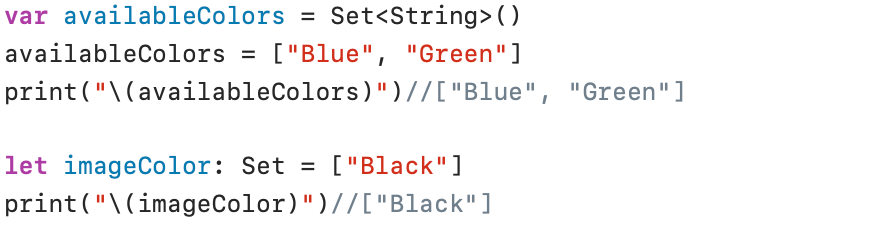
In the first line of the example above, an empty Set named availableColors is created. The data type of this Set is String. In the second line the Set named availableColors is initialized with the values “Blue” and “Green“.
An empty Set can be created with Set<data type>(). Don't forget the parentheses () at the end!
In the imageColor example, a Set named imageColor is created and initialised with one item. The data type of the Set is String (the data type is inferred from the String value “Black“).
Set properties and methods
Set Properties
isEmpty
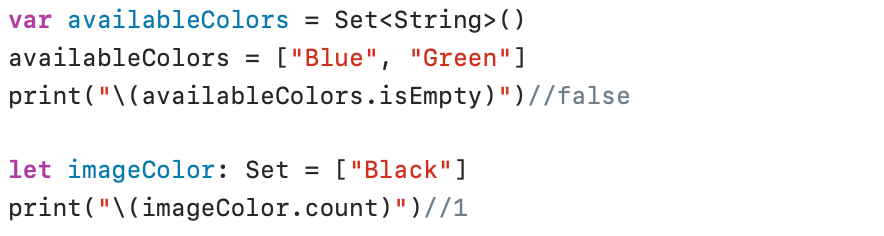
The isEmpty property is also available for Sets:

count
The count property is also available for Sets:
Set Methods
contains()
The contains(_:) method checks whether a specific item is present in a Set:

insert()
The insert(_:) method can be called to add a new element to a Set:

Note that the order of the elements in the printout is completely random.
Because the items in a Set do not have a fixed position, it is not possible to use the insert(_:at:) method to specify a position in the Set.
If you try to add an element to a Set that already exists, this element will be rejected. No error message will appear.

remove()
An element can be removed from a Set with the remove(_:) method:

removeAll()
The method removeAll(:) removes all items from a Set:

Dictionaries
A Dictionary stores a relationship between a key element of a specific type and the corresponding value of a specific type. As with Sets, the order of the elements is not preserved.
If, for example, you want to store a collection of international telephone area codes, along with the corresponding country names, you can use a Dictionary for this. The key then becomes the international telephone code, and the name of the country is the value associated with this key.
Create a Dictionary
A Dictionary named telephoneCodes can be created and initialized as follows:

The key is defined as an Int and the corresponding value must be a String. The above instruction creates an empty Dictionary.
A Dictionary can also be created and initialized with real data as follows:

This statement creates a Dictionary called telephoneCodes and immediately creates two elements: telephone area code 32 for “Belgium” and telephone area code 1 for the “United States”.
Dictionary properties and methods
Dictionary Properties
isEmpty
The isEmpty property can also be used with Dictionaries:

count
The count property can also be used with Dictionaries:
Dictionary methods
Add new Dictionary item
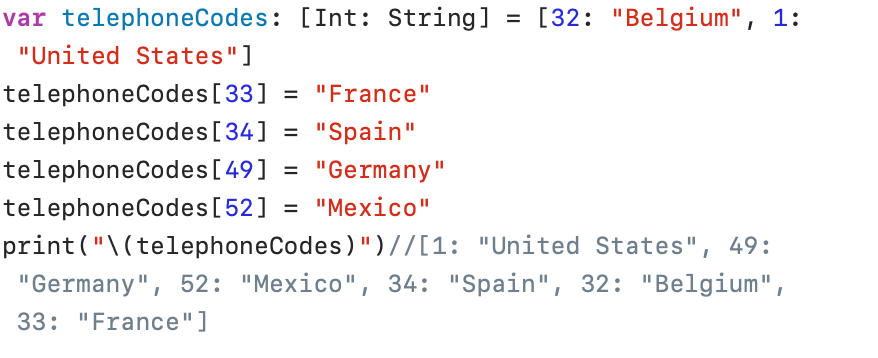
New items can be added to the Dictionary using the following general syntax:
Dictionary_Name[key] = value
updateValue()
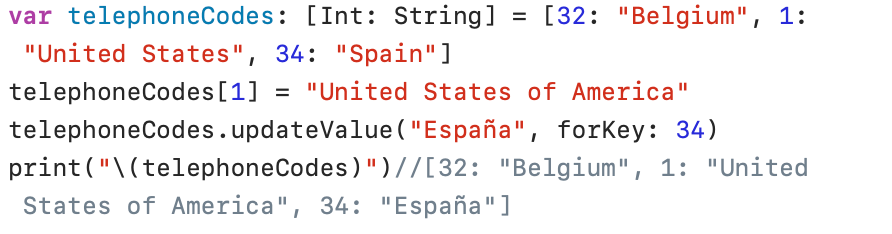
To update a value in the Dictionary you can use the syntax above or you can use the updateValue(_:forKey:) method:
The updateValue(_:forKey:) method returns the original value of the changed item. In this case, you can therefore print both the old and the new name:
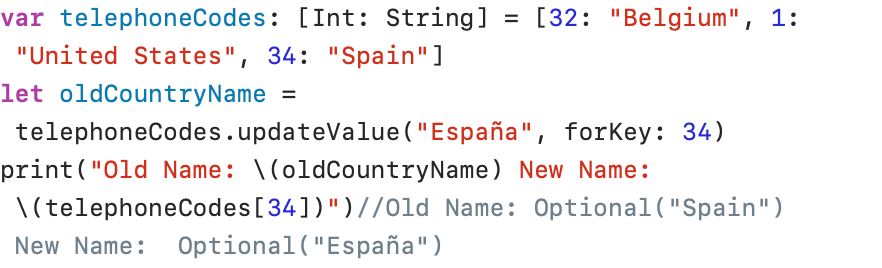
The oldCountryName constant receives its value via the updateValue method. If the element you want to update does not yet exist in the dictionary, there is no old value and the oldCountryName constant becomes nil. To prevent errors, it is better to declare the oldCountryName constant as optional.
removeValue()
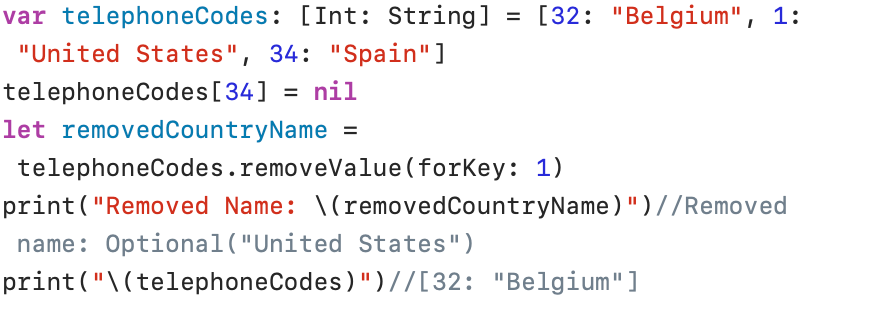
To remove an element from the Dictionary, you can use the removeValue(forKey:) method or update the value to Nil:
removeAll()
All items in a Dictionary can be removed with the removeAll(:) method.

contains()
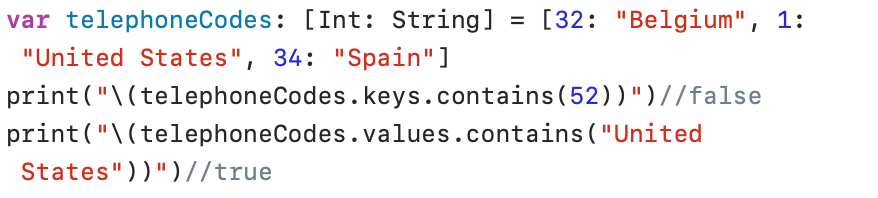
The contains(_:) method allows you to check whether either a key or a value is present in the Dictionary. The keys can be checked via Dictionary_Name.keys and the values can be retrieved via Dictionary_Name.values.