
Introduction
A structure (struct) is a building-block in Swift used to encapsulate data (properties) and functionality (methods) into a single data type. Structures are very important data types in Swift. Apple even recommends choosing structures over classes. Apple reserves classes for very specific functionalities that are not available in structures.
In this lesson, we discuss the syntax for creating a struct and defining instances based on a struct.
Define a struct
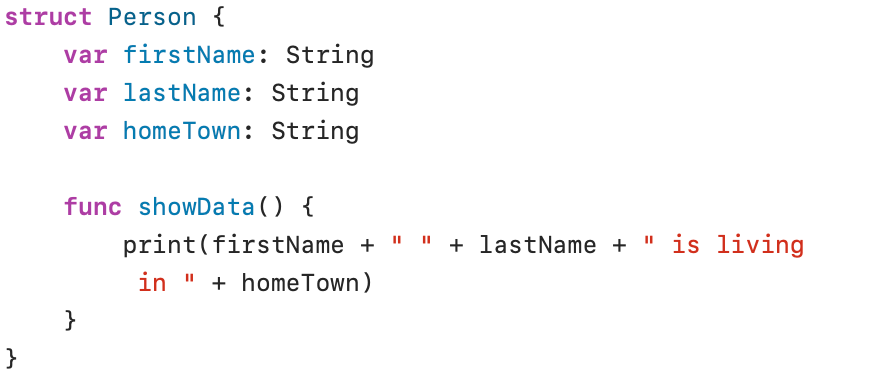
The struct Person defines three properties (firstName, lastName and homeTown) and one method (showData()).
Data belonging to a struct are called properties. Functionalities (func) in a struct are called methods.
The name of a structure is written in UpperCamelCase (all words in the name begin with a capital letter). The names of properties and methods are written in lowerCamelCase (the name begins with a lowercase letter, all other words in the name begin with a capital letter).
Create an instance
A struct is a custom-made data type. To use this data type, you must create an instance of it:

dean is an instance of the struct Person. The properties of the new instance are initialized with the data passed between parentheses (membership initializer).
Calling instance methods
The instance called dean can then be used to call the member method showData() to print the information stored in the properties:

Accessing instance properties
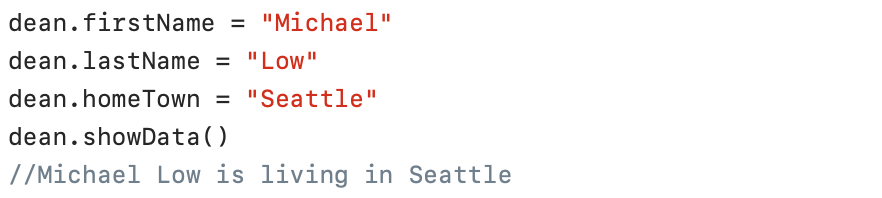
The struct property values can also be retrieved and changed using the dot syntax:
Struct is a value type
A struct is a value type in Swift. This means that all information of the original struct is copied when it is assigned to a constant, variable or used as a parameter. The following screenshot clarifies this:
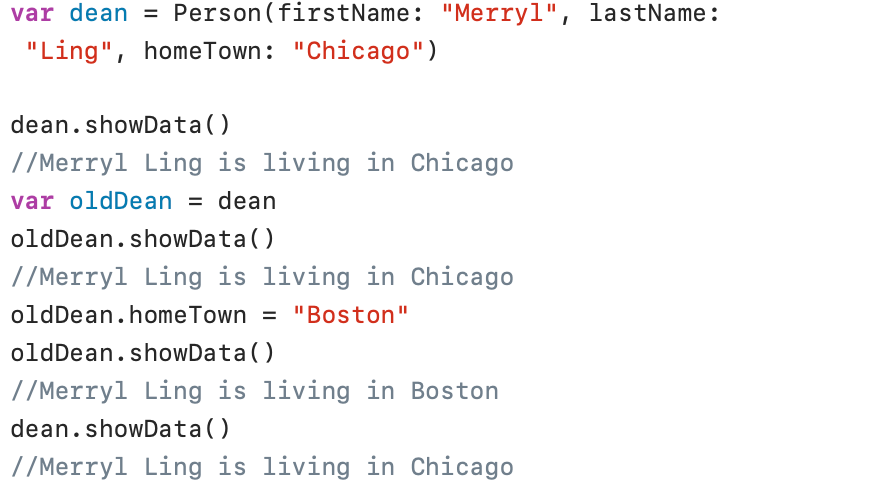
The statement var oldDean = dean copies all data from the instance dean to a new structure oldDean. Both structures now contain the same data. If you now change the homeTown of the oldDean structure, the homeTown of the dean instance remains unchanged.
A struct is a value type in Swift! An enum is also a valuetype in Swift! A class is a reference type in Swift!
Properties
Stored properties
A stored property is a constant or variable stored as an instance in a particular structure. In the structure named Person, the properties firstName, lastName and homeTown are examples of stored properties.The following points are important when using stored properties:
- A stored property defined as a constant (let) can be initialized during its creation, but cannot be modified afterwards.
- An instance of a struct assigned to a constant no longer allows its stored properties to be changed (even if declared as a variable (var)).
Computed properties
A computed property doesn’t store a value but uses a getter and setter to retrieve (get) and set (set) some other values in a struct. In the following example, we use computed properties (fahrenheit and kelvin) to perform all calculations for converting Celsius, Fahrenheit, and Kelvin temperature data:
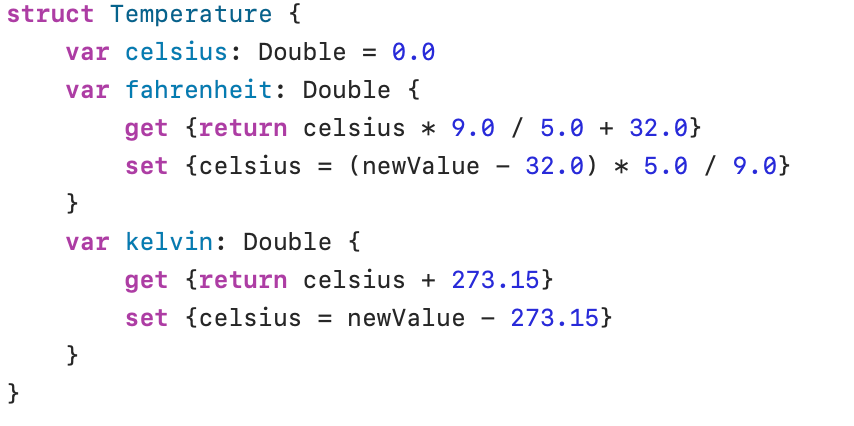
set is executed when you assign a value to a computed property, get is executed when you retrieve a value from a computed property. The constant newValue is an automatic constant, provided by Swift, to store the value assigned to that property.
In the following screenshot, get is used to calculate the values for degrees Fahrenheit and Kelvin:
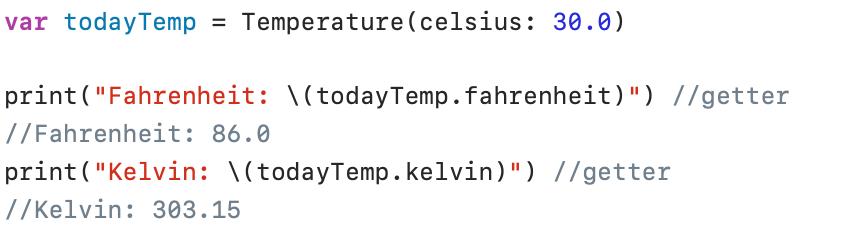
In the following screenshot, the kelvin set is used to calculate a new value for the stored property celsius. The new calculated value in celsius is then used by the fahrenheit getter:
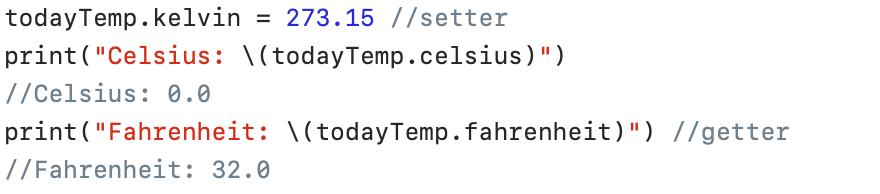
Property observers
A property observer detects changes to a property value and responds to every access that occurs. Swift offers two observers:
- willSet: the willSet observer is called before the property value is changed;
- didSet: the didSet observer is called after a change to the property value has taken place.
In the following example, we use a didSet observer to respond to a change of the property score:
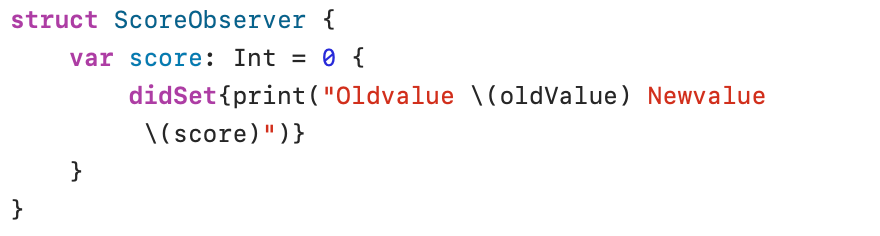
oldValue is an automatic constant created by Swift with the previous value of the property.
And these are the results:
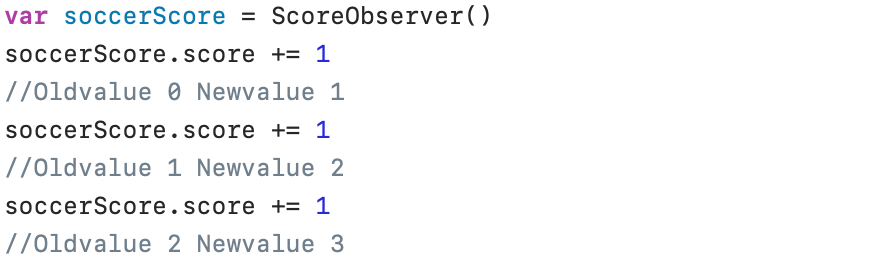
Property wrappers
In practice, various checks often need to be performed on data before this data is used further in the program. To avoid having to repeat the same checks in different places in the program, property wrappers can be used.
An example can clarify this. At a university, exams are graded with points between 0 and 20 (0 and 20 inclusive). These points are entered into the computer system in various ways: manually by a lecturer, manually via the secretariat, digitally from an optical character recognition (OCR) reader, and so on. Every entered point must be checked to ensure that the registered value lies between 0 and 20.
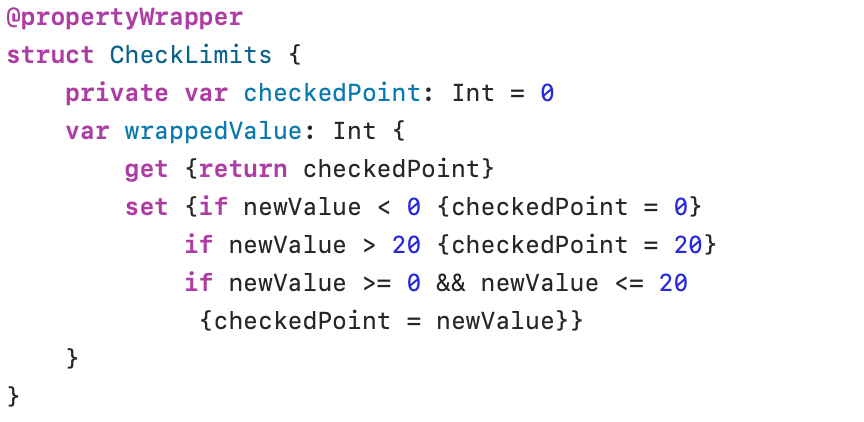
The definition of a property wrapper starts with @propertyWrapper. A property wrapper must contain a property named wrappedValue. The setter of the wrappedValue property contains the controls to define the accepted value (checkedPoint). The property checkedPoint is defined as private. This means that this property is not accessible from outside the structure. Only the getter and setter of the property wrappedValue in the structure have access to this variable.
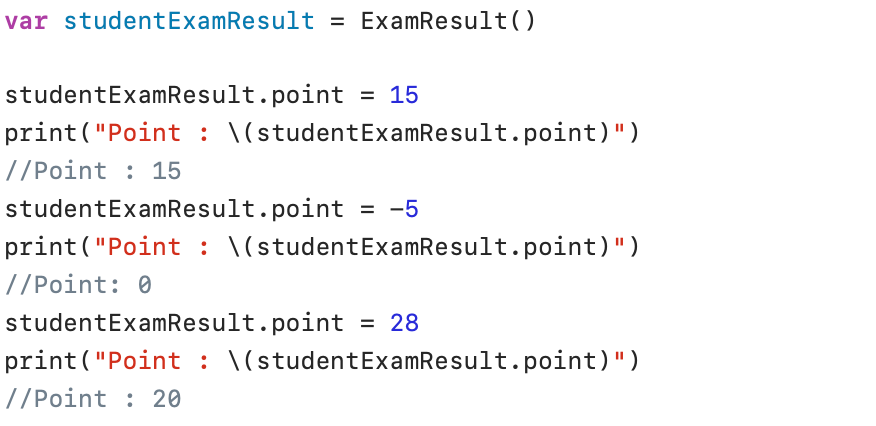
To use the wrapper, add the name of the wrapper (@checkLimits) before the property definition:

The variable point in the above structure will use the wrapper @checkLimits to check the value entered in point.
Static properties
In all the preceding examples, the properties belonged to the instances that were created based on a structure. As you may recall from the previous discussion, the data for the dean and oldDean instances were different.
Static properties do not belong to instances, but to the structure itself. Static properties are shared by all instances of a structure.
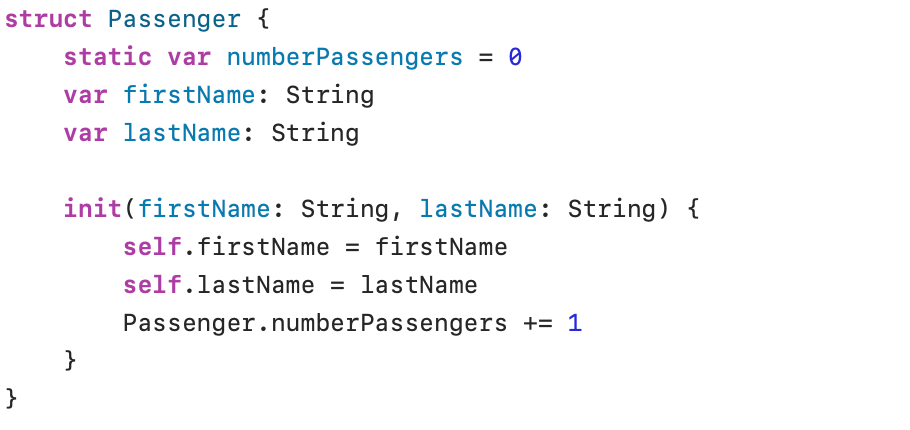
The variable numberPassengers belongs to the structure named Passenger.
The init() method initializes the data in the structure. A new instance receives the data (firstName and lastName) that were sent when creating a new instance. Both data elements are stored in the created instance (indicated by self) in the variables firstName and lastName. The init() method also increases the static variable numberPassengers by 1. Because we are not referring to an instance, but to the structure itself, we use the name of the structure to refer to this static variable (Passenger.numberPassengers).
Let’s put some passengers on board the plane:

Although we have created two instances, the static variable Passenger.NumberPassengers counts the number of passengers correctly. To refer to this static variable, we use the name of the structure followed by the name of the static variable (dot syntax).
Methods
Static methods
Just like static properties, static methods belong to a type and not to an instance. A static method is available in a structure and can be called without creating an instance. Dot notation is used here as well: the name of the structure followed by the name of the static function.
And here’s our temperature example back again:
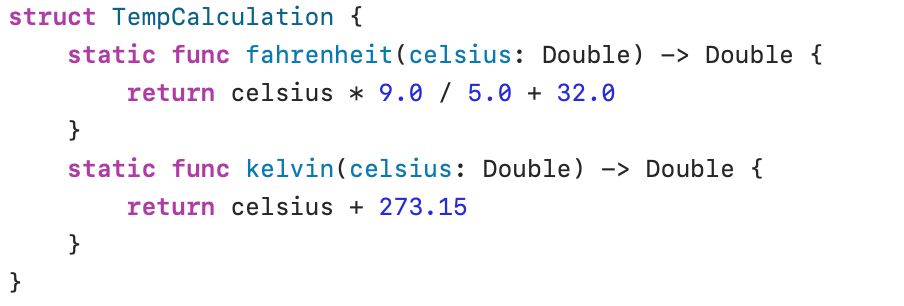
The fahrenheit() and kelvin() methods are static. These methods can now be used without creating instances:
